
LCMD Photos New Features
This article introduces four new features recently released in LCMD Photos.
1. Cloud Drive Photos Import and Management
Feature Overview
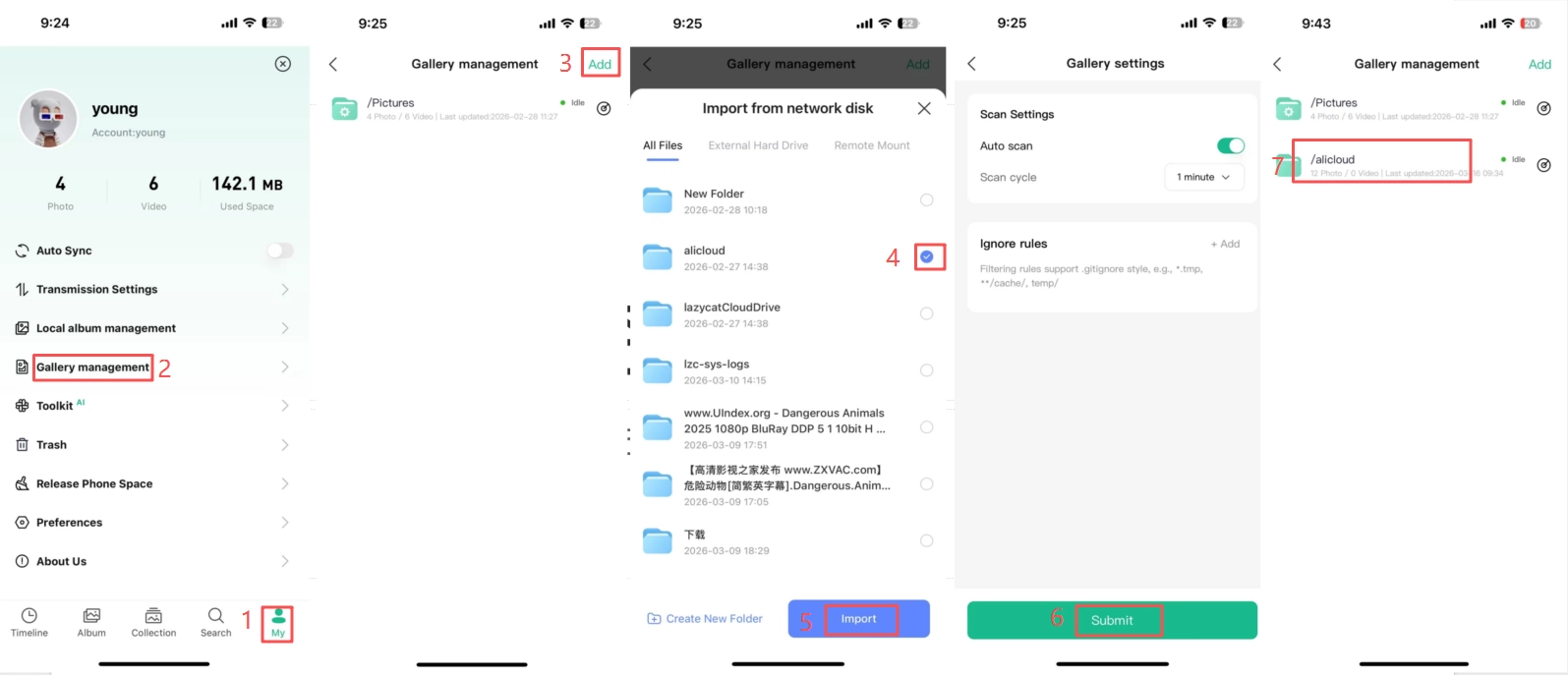
Batch import photos and videos from LCMD Cloud Drive into your albums — without using any extra storage space. It supports custom path, enabling you to manage scattered media files from multiple locations in just one click.
Operating Steps
Enter LCMD Photos → My → Gallery Management → Add →Select Path → Import →Submit
Once the scan is complete, you can access it from timeline or new path.
Key Highlights
- ✅ Zero additional storage overhead
- ✅ Batch path import
- ✅ Automatic file type recognition
2. Mobile Phone Album Import & Management
Feature Overview
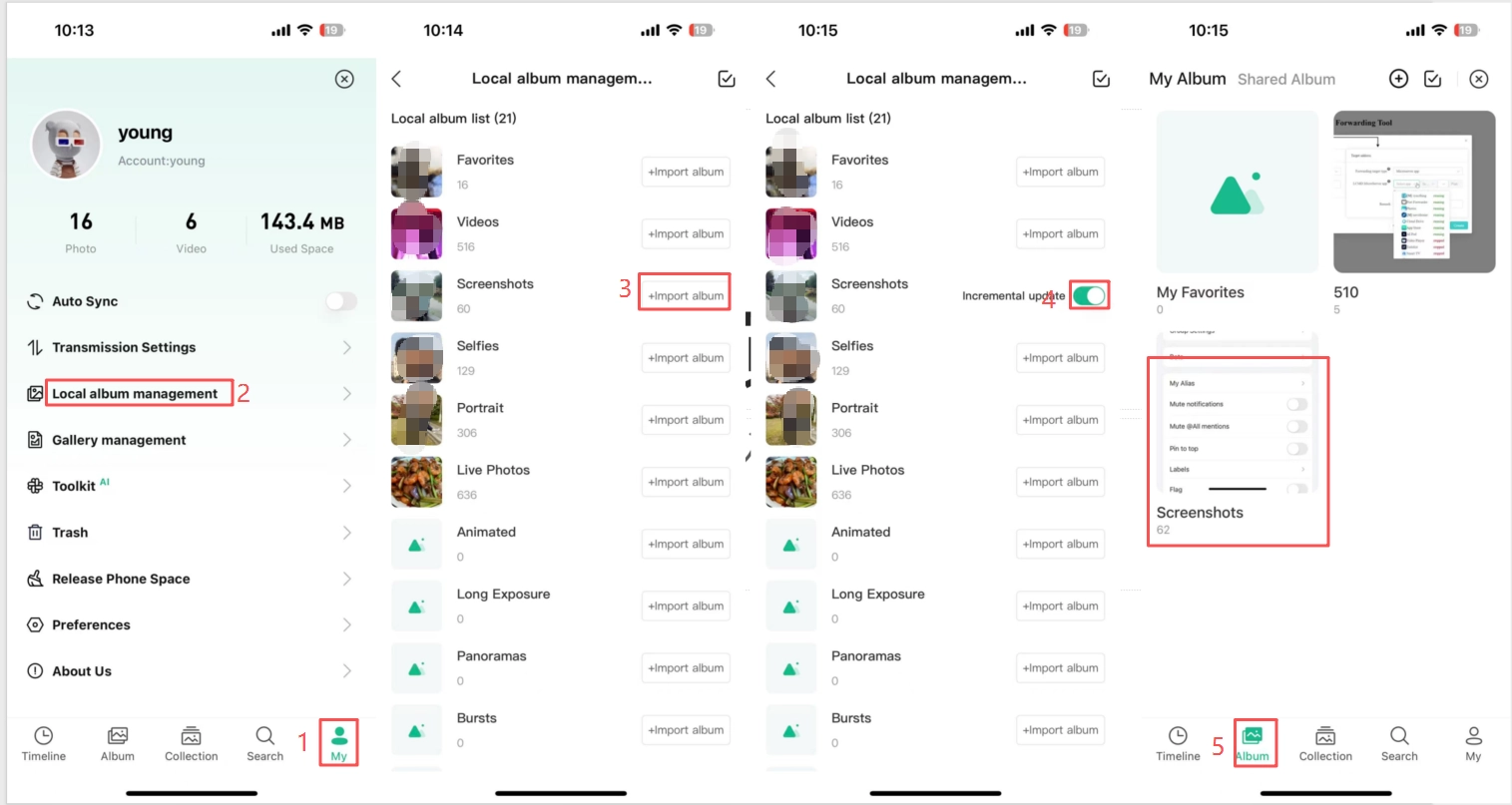
Automatically or manually sync local photo albums from your mobile phone to LCMD Photos. A dedicated album is created automatically on your first import. A dedicated album is automatically created during your first import. Subsequent syncs only update newly added content, saving both data and time.
Operating Steps
Enter LCMD Photos → My → Local Album Management → Select album → Import
Settings Options
| Item | Description |
|---|---|
| Auto update | When enabled, new content in your phone's photos is auto synced. |
| Manual import | On-demand import — greater flexibility. |
Preview
Once the import is complete, return to LCMD Photos → scroll down on Album page to view the newly imported photos.
3. AI Album Search and Time Settings
Feature Overview
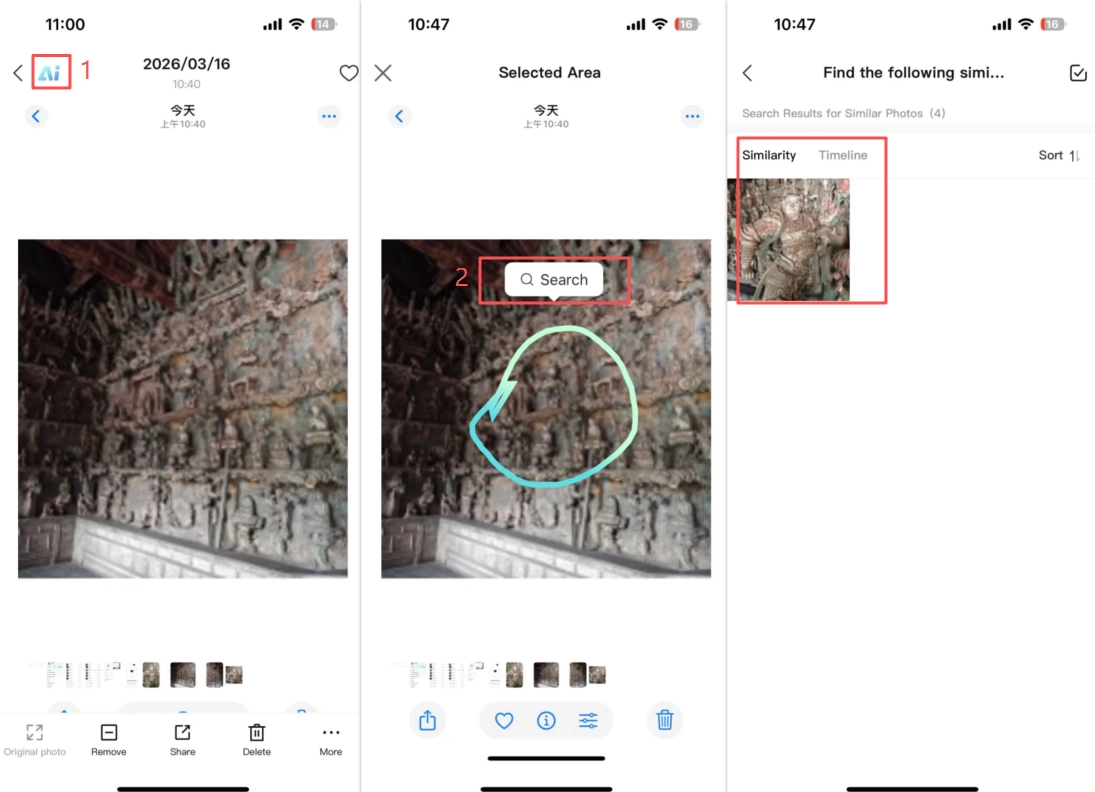
It supports dual-mode search— Natural Language Search & Element-based Area Search—while AI automatically identifies on-screen content, scenes, and individuals. Furthermore, it allows for the customization of training schedules, enabling users to avoid periods of peak system load.
Search Method
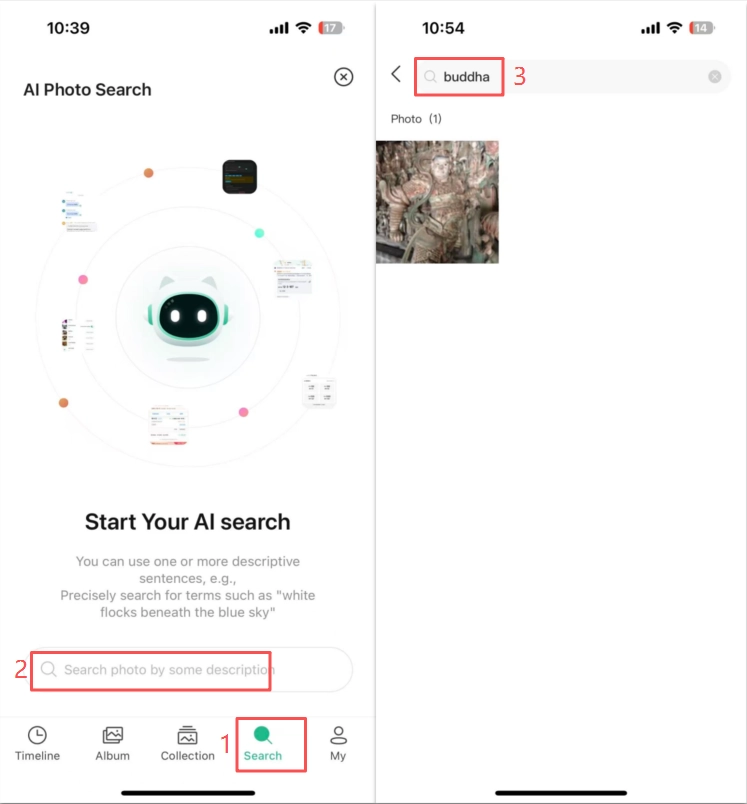
Method 1: Natural language search
LCMD Photos → Search → Enter description words
| Search Type | Key words |
|---|---|
| Scenes | Beach, snow-capped mountains, restaurant, sunset at the seaside |
| People | kids, group photo, selfie, family photo |
| Objects | ID card, invoice, pet, license plate |
Method 2: Element-based Area Search
Open the target image → Tap "AI" in the top-left corner → Circle the key elements → Search for similar content
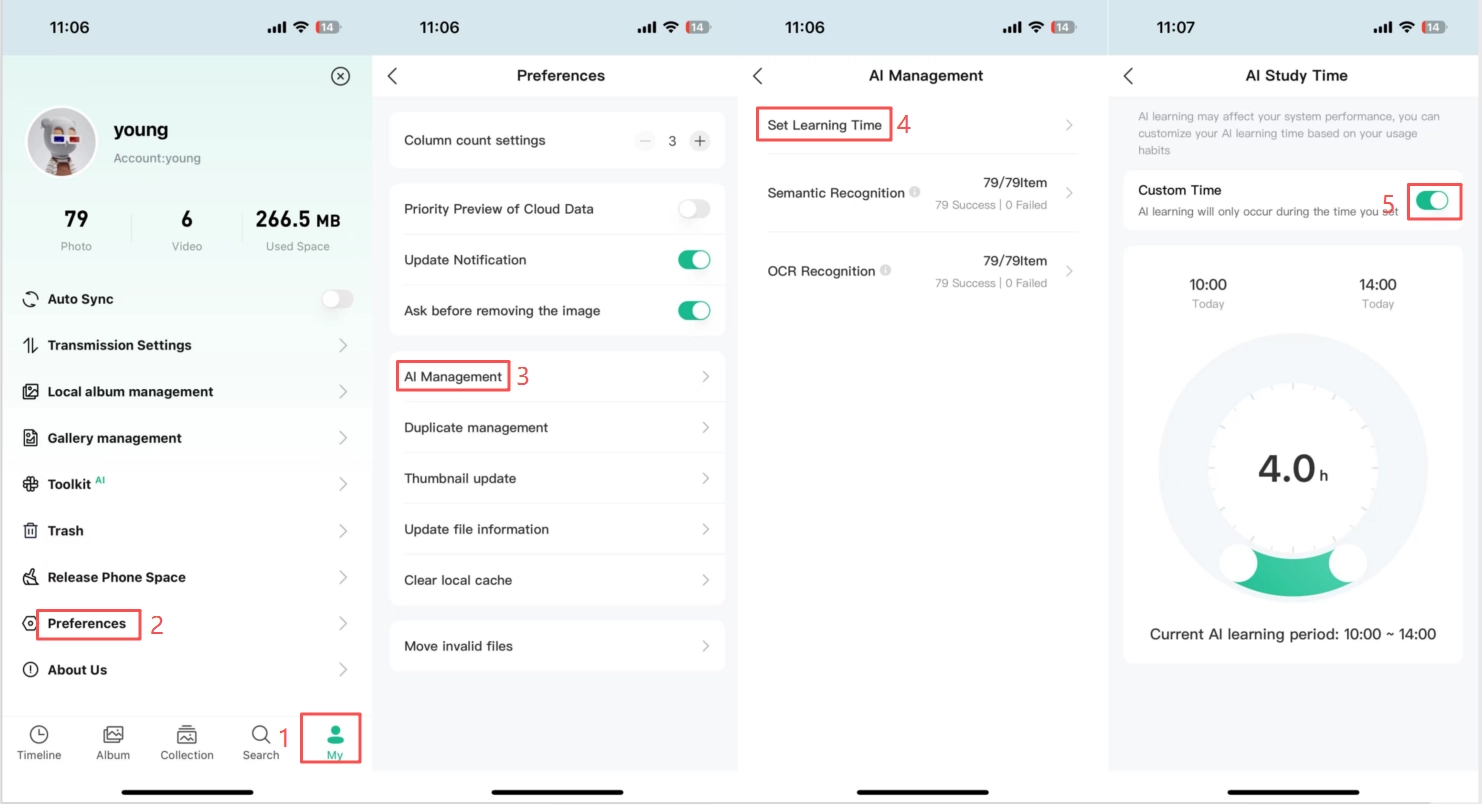
AI Training Time Settings
LCMD Photos → My → Preferences → AI Management → Set Learning Time
4. Smart Album Auto-categorization
Feature overview
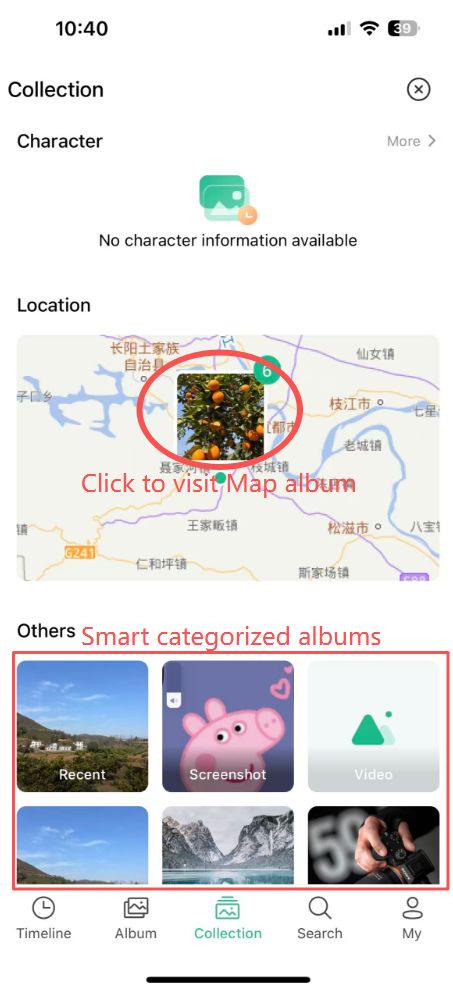
Powered by local intelligent analysis, it automatically creates multi-dimensional albums and keeps large photo libraries perfectly organized.
List of Intelligent Categories
| Heading | ||
|---|---|---|
| Type | Icon | Description |
| Map album | 🗺️ | GPS positioning clustering, footprint visualization |
| Screenshots album | 📱 | Automatically identify screenshots and categorize them. |
| Video album | 🎬 | Video files are organized into separate albums, with preview support. |
| Live photos album | 📸 | Live photo collection |
| GIF album | 🎞️ | GIF photos auto collection |
Access Entry
LCMD Photos → Collection
5. Conclusion
| Features | Key Highlights |
|---|---|
| Cloud drive import | Centralized management, zero extra storage. |
| Mobile phone sync | Automatic incremental update, saving time and space. |
| AI search | Natural language + Area selection, smarter image search. |
| Smart categorization | Local analysis, automatic categorization, private & secure. |
All features are based on local storage and computing, ensuring a convenient and secure experience.