
Auto-Update Your Private Cinema with LCMD
Overview: Totoro + Lazy Cat Movie Search Skills: Automatically update your private cinema's library with a single command.
1. Feature Show-off
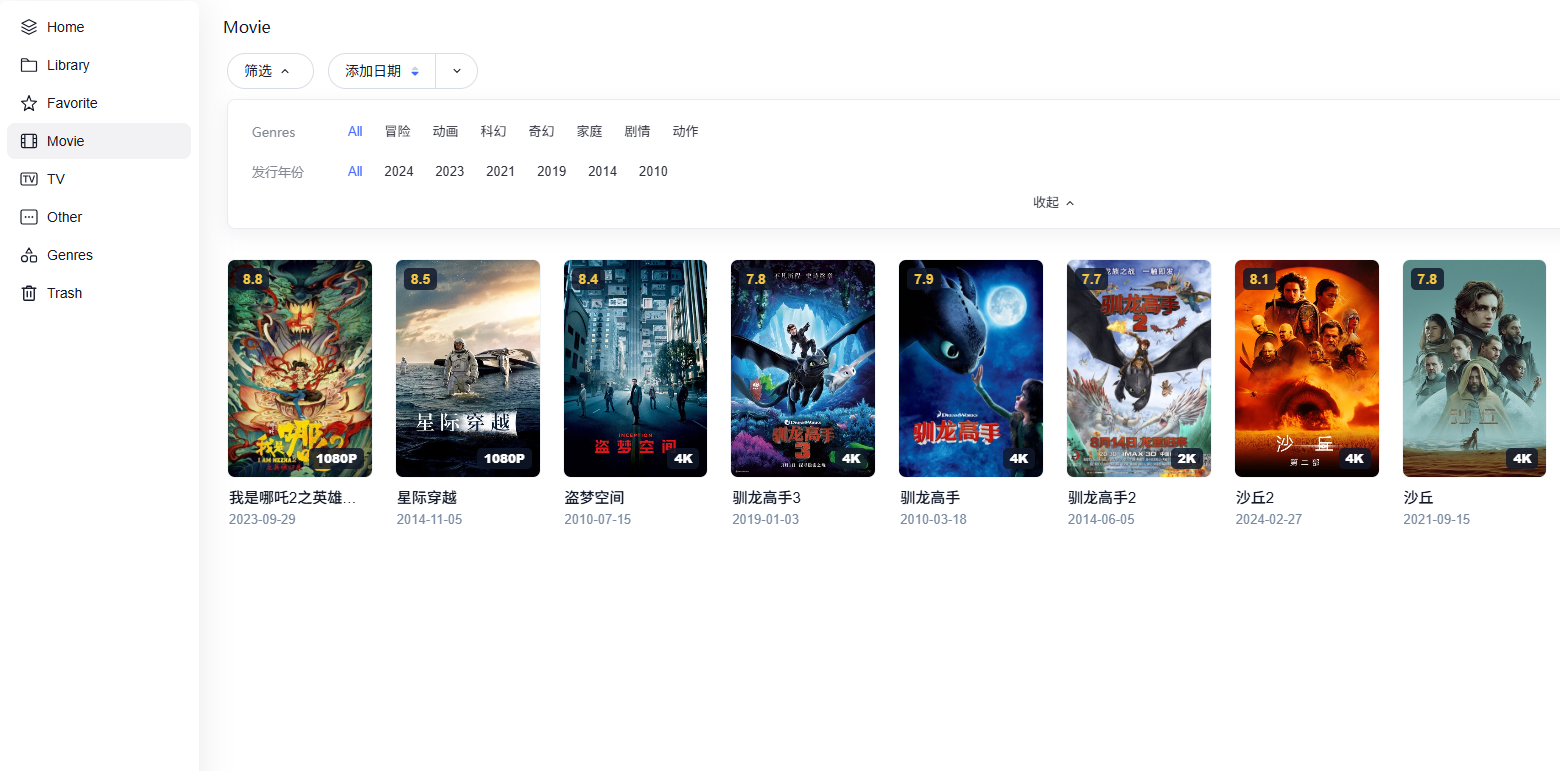
Those are my movies in my App Movies.
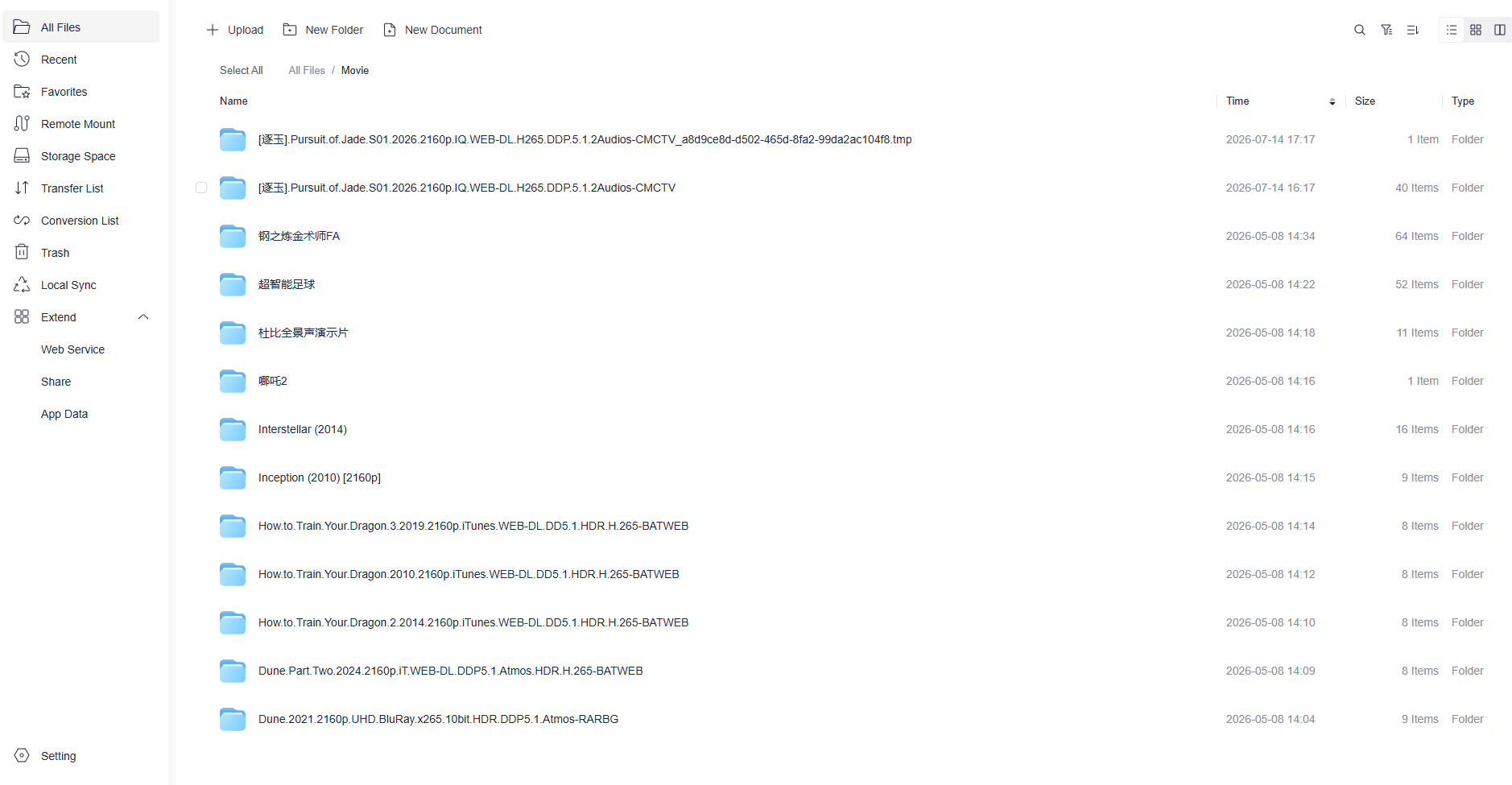
The screenshots of Movies in my Cloud Drive
2. Experience It with a Single Sentence
"Totoro" is an AI assistant running on the LCMD microserver. You enter one sentence to it, and it handles the entire process — searching for a movie, selecting it, downloading it, and adding it to your library.
Load the Lazycat Movie Search skills and help me download the 4K version of *Interstellar*.
It’s quite simple. You no longer need to open your browser to search for resources, copy magnet links, switch to your download client to paste them, and then manually scan your library after the download finishes. "Totoro" handles the entire process from start to finish.
3. Preparations
You need to install three apps and configure one key setting.
Step 1: Install Totoro first.
Open the App Store, and search for "Totoro."
Once installed, launch the app and follow the guided setup to complete the initial configuration (DeepSeek V4 Pro model is highly recommended). "Totoro" acts as the "translator" between you and all the "Lazy Cat" skills: send all your commands to it.
Step 2: Install VueTorrent (torrent downloader)
Search for VueTorrent in the App Store.
Install and launch VueTorrent. Default login credentials: admin / adminadmin.
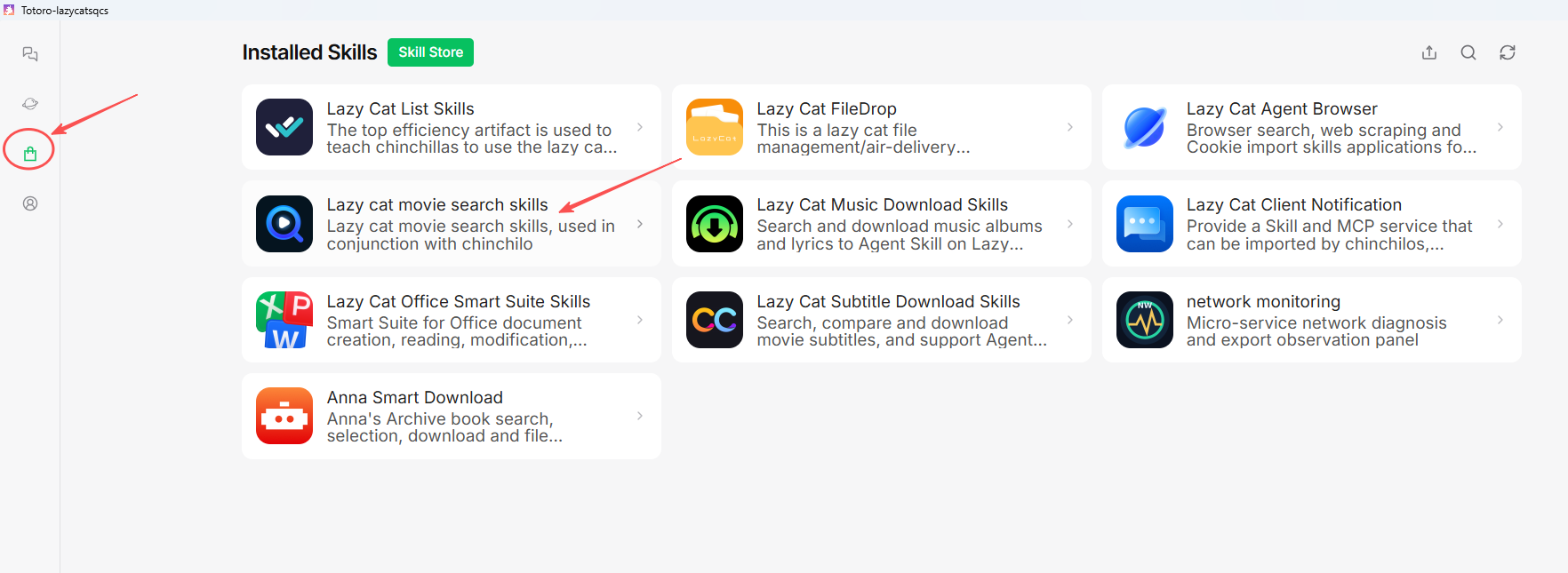
Step 3: Install the "Lazy Cat Movie Search" skill.
Go to the app store and search for "Lazy Cat Movie Search skills."
Click "Install." This is a "Skill" — think of it as a plugin for Totoro. Installing it enables Totoro to search for and download movies.
Step 4: Enabling a Skill in Totoro
Open Totoro → Enter the conversation → Tap the Settings or Skill Management section → Locate "Skill Management."
You will see a list of skills. Find "Lazy Cat Movie Search skills" and toggle the switch to turn it on.
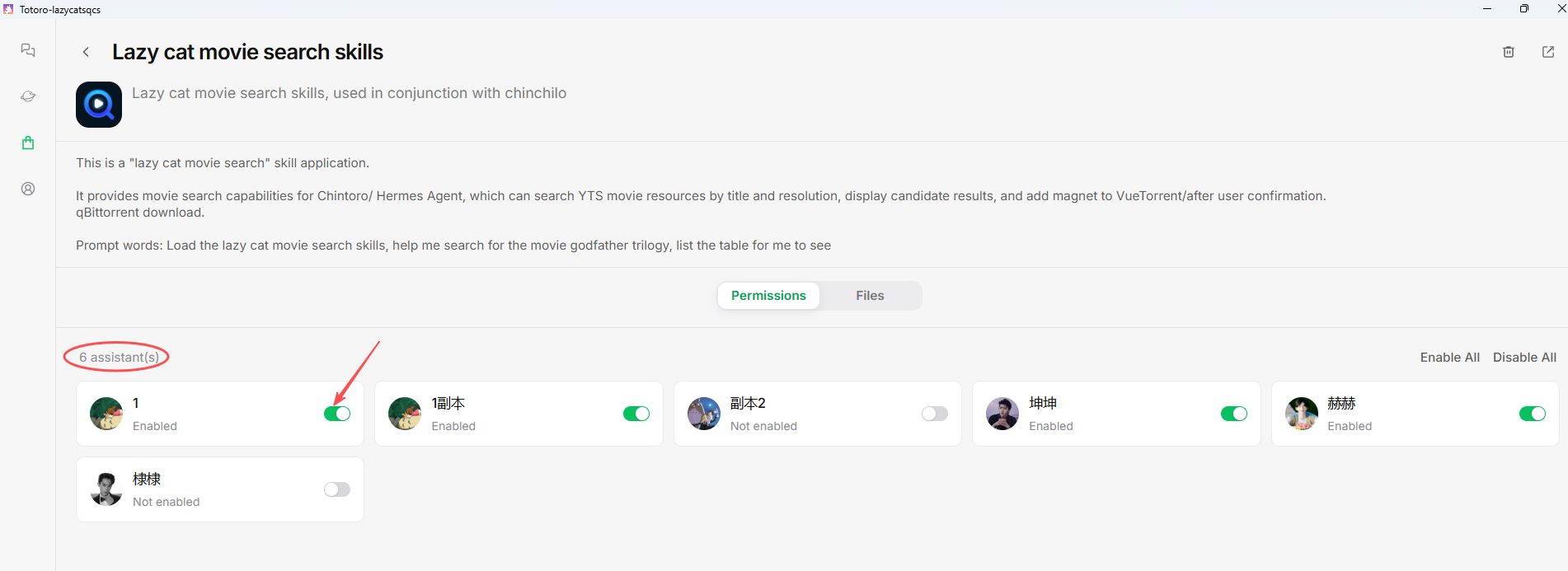
Once this step is complete, the Totoro will be equipped with movie search capabilities.
Step 5: Enter your command in chatbox.
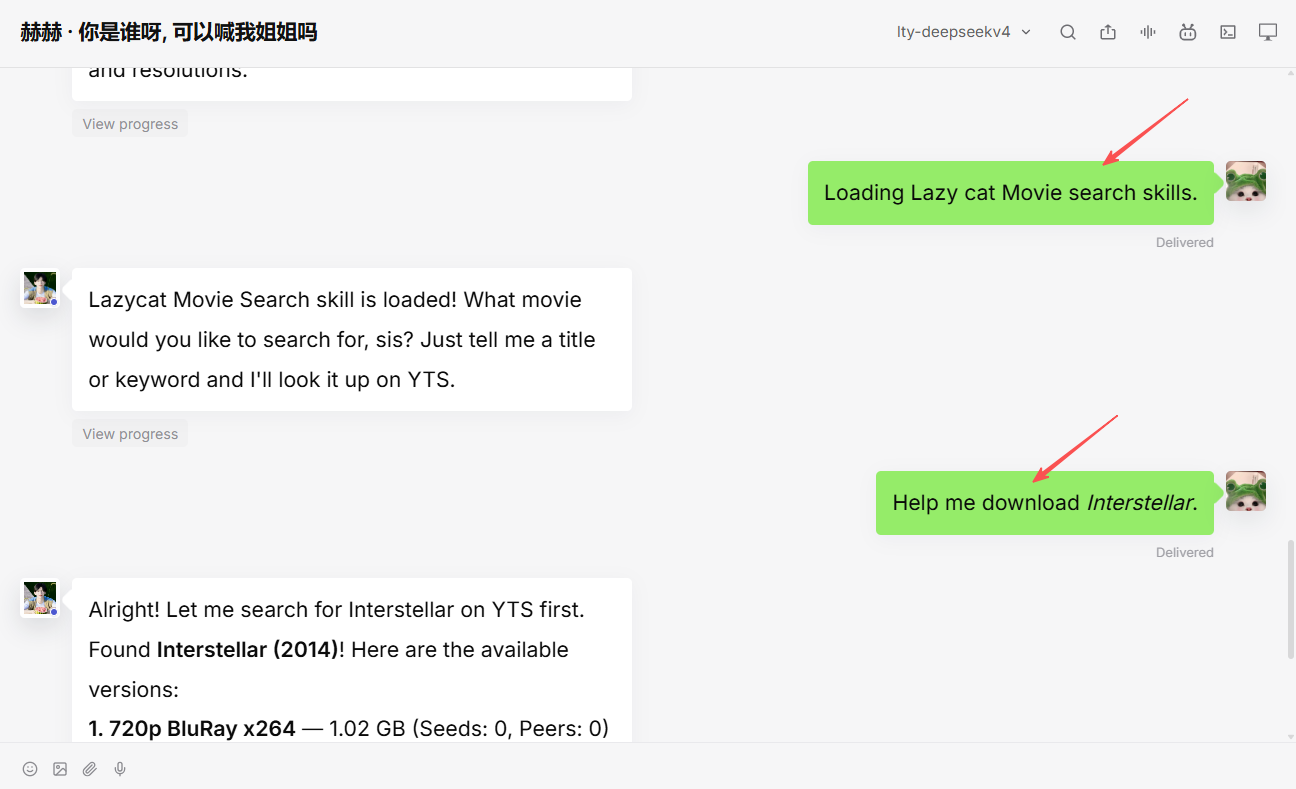
Loading Lazy cat Movie search skills.

Help me download *Interstellar* or

Download the 4K version of *Inception*

Look for Nolan's *The Dark Knight Rises*

Search for the top 10 movies on the Douban Top 250 list

I want to watch *The Shawshank Redemption*
Upon receiving a command, Little Totoro performs the following actions:
Search for resources: Automatically searches movie resource sites (such as YTS) to find correct video sources.
Display search results table: If no specific resolution is specified, Totoro lists all available versions, for example:
Make your selection, then confirm:
I want the 4K version.
4. Advanced Techniques
Sequential Downloading + Play-While-Downloading
By default, BitTorrent downloads file chunks randomly. This means data from the first few minutes might be scattered across different parts of the file, making it impossible to start playing early.
Sequential download mode: download data in order from start to finish. When combined with a player's "play-while-downloading" feature, you only need to wait for the first 2–3% to download before you can start watching — the video downloads segment by segment from the beginning, and the player smoothly plays the parts that have already been downloaded while the rest downloads in the background.
The "Lazy Cat Movie Search skills" tool enables sequential download mode by default when adding tasks.
Torrent Popularity
Search results display "Seeds" and "Peers" data. The higher the number of seeds, the faster the download speed. Popular new releases often have hundreds or even thousands of seeds, whereas obscure or older films might have only a few — or none at all.
High seed count (100+): Download a 4K movie in minutes.
Moderate seed count (10–99): Download takes a few hours.
Zero seeds: The download may never complete (though there are exceptions).
If a movie has very few seeds, Totoro will alert you in the search results, allowing you to decide whether to choose a different title or wait.
Automatic Metadata Scraping and Library Import
If you have also installed Lazycat Movies (or a scraper like Jellyfin or Emby), the system will automatically scan the designated directory once a movie download completes. It matches and retrieves posters, synopses, cast information, and ratings. The downloaded movies appear in your media library, ready for immediate playback.
Prioritizing Highest Quality
Lazycat Movie Search skills prioritizes displaying 4K (2160p) versions. If you don't specify a resolution, the bot will ask you to choose; if you explicitly request "4K" or "highest quality," it will automatically select the best version for download.
5. FAQs
Q: What should I do if I can't find the movie I want to watch?
A: Try searching using the English title or including the release year. For example, searching for "Braveheart 1995" has more accurate results than searching for "勇敢的心" (Braveheart). If it isn't available on YTS, you can also tell Totoro (小龙猫) to "search using IMDb ID" or "search on rarbg."
Q: Why is the download speed so slow?
A: Check the number of seeds. Obscure movies have fewer seeds, so speeds are naturally slower. Another possible reason is an incorrect upload speed limit setting in VueTorrent — Totoro automatically checks and sets the upload limit (128 KiB/s) when adding tasks to prevent uploads from saturating the bandwidth and slowing down downloads.
Q: Can I switch from sequential download mode to normal mode midway through?
A: Yes. Locate the task in the VueTorrent task list, right-click it or open its details, and toggle off the "Sequential Download" option. Generally, there is no need to switch, as sequential downloading is more convenient for most playback scenarios.
Q: What should I do if I accidentally download a duplicate movie?
A: Stop and delete the redundant task in VueTorrent, then delete the corresponding file from the Cloud Drive. Lazycat Movies will automatically remove the entry for the deleted file during the next library scan.
6. Summary
The entire process consists of just three steps:
Install the following from the app store: Totoro, VueTorrent, The Movies, and the Lazycat Movie Search skills.
Set the VueTorrent download directory to your cloud drive.
Enable the movie search skill within the Totoro, then say a command to it.
From then on, whenever you want to watch a new movie, simply open Totoro and say:
Loading the Lazy cat Movie skill.

Help me download *Movie Title*.
Your private cinema automatically adds new releases!